Ingress in Kubernetes
In Kubernetes (K8s), inbound proxies are called ingress.
Ingress allows external access to internal Kubernetes cluster resources. It uses a load balancer that can be either inside or outside the cluster.
Ingress Features:
- Provides external URLs for services.
- Load balances traffic.
- Terminates SSL/TLS.
- Supports name-based virtual hosting.
We’ll explore:
- Ingress Controller
- Ingress Resources
Without Ingress
You are deploying an application on Kubernetes for a company that has an online store selling products. Your application would be available at my-online-store.com. You build the application into a Docker image and deploy it on the Kubernetes cluster as a pod in a deployment. The application needs a database, so you deploy a MySQL database as a pod and create a ClusterIP service called mysql-service to make it accessible only inside the cluster.
To make the application accessible to the outside world, you create a NodePort service and make your application available on a high port, such as 30080. Users can access your application using the URL http://[NodeIP]:30080. This setup works, and users can access the application. As traffic increases, you scale up the pods, and the service load balances traffic between them.
However, in a production-grade application, there are more things to consider. For example, you don’t want users to type the node’s IP every time, so you configure your DNS server to point to the node IP. Now, users can access your application using my-online-store.com:30080. But you don’t want them to remember the port number either, and NodePort services can only use ports above 30000. So, you add a proxy server between the DNS server and your cluster that proxies requests on port 80 to 30080. Users can now access your application using my-online-store.com.
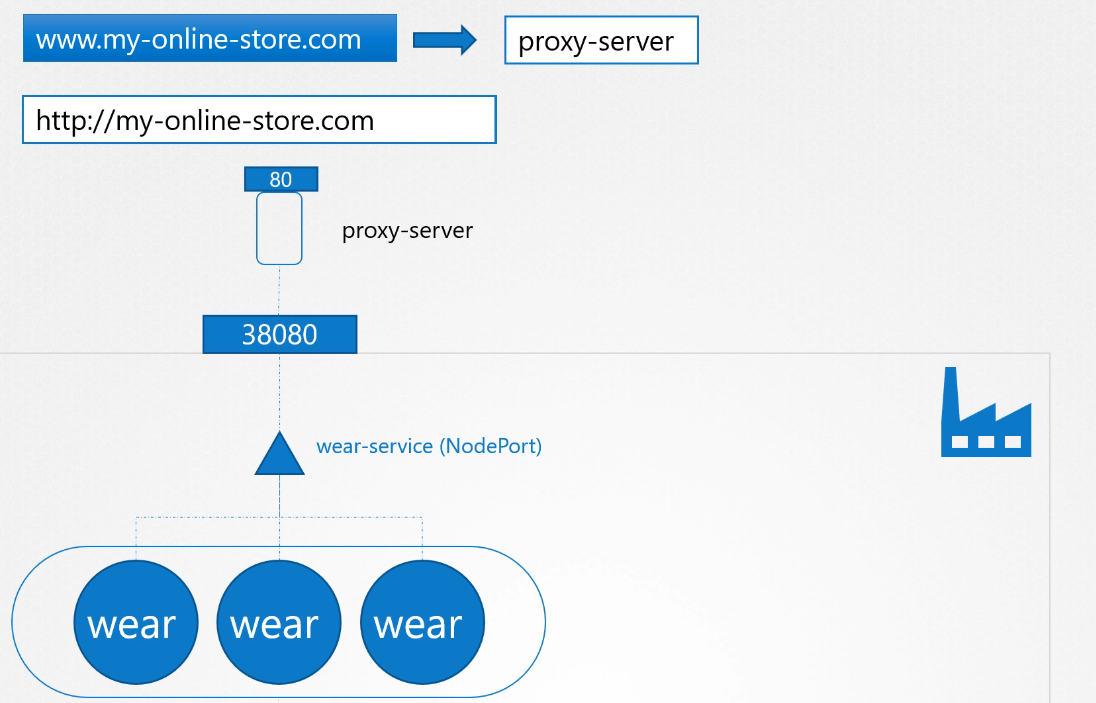
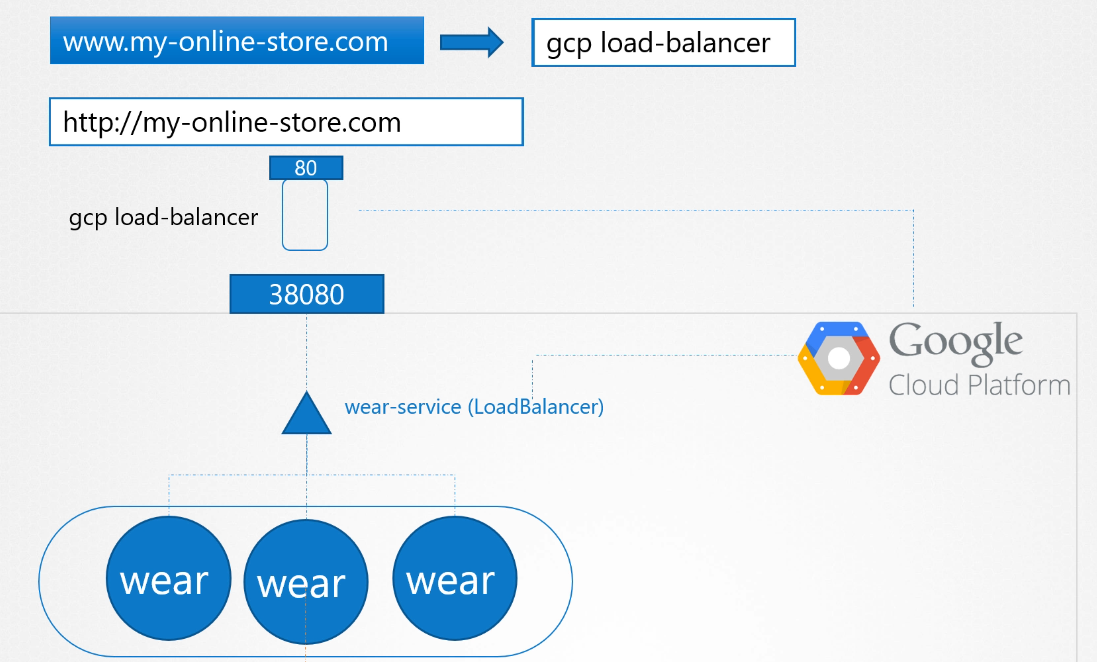
If your application is hosted on-premises, this setup works well. On a public cloud like Google Cloud Platform (GCP), you could set your service type to LoadBalancer. Kubernetes will provision a high port and send a request to GCP to create a network load balancer. The load balancer has an external IP that users can access. You then set the DNS to point to this IP, and users access the application using my-online-store.com
As your company grows, you may have new services like a video streaming service. You want users to access it at my-online-store.com/watch and the old application at my-online-store.com/wear. You deploy the new application as a separate deployment in the same cluster and create a LoadBalancer service called video-service, which allocates a new IP and port. But each additional load balancer costs money, so you need a solution that routes traffic based on the URL.
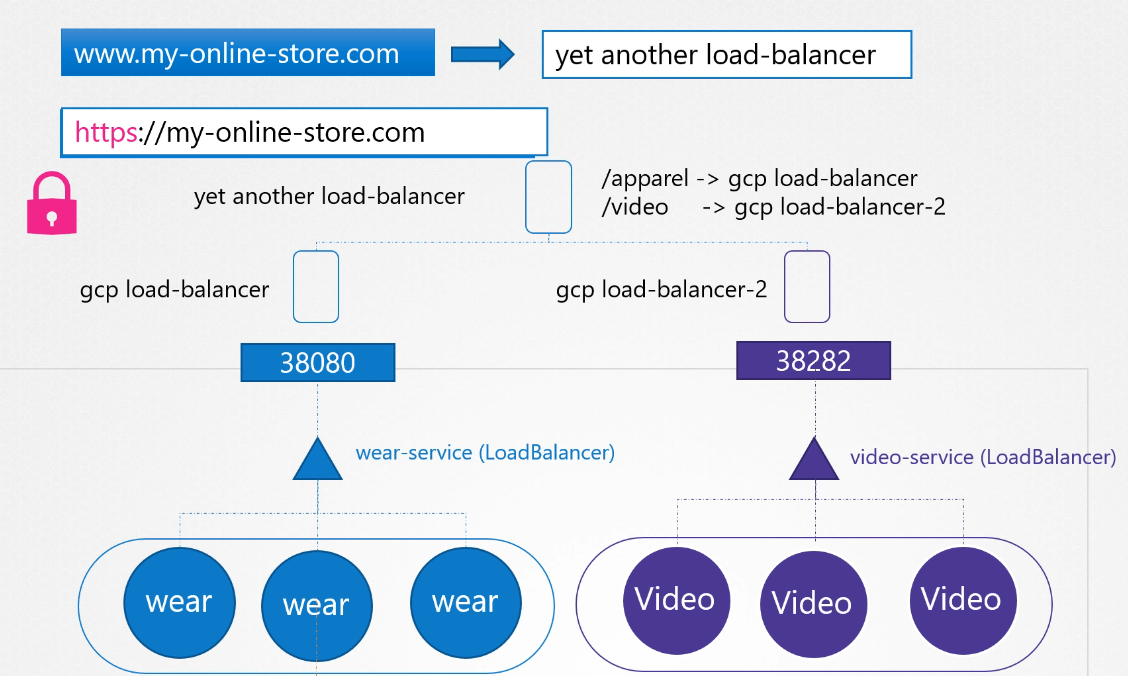
With Kubernetes Ingress
Ingress helps you manage everything within the Kubernetes cluster using a single, externally accessible URL.
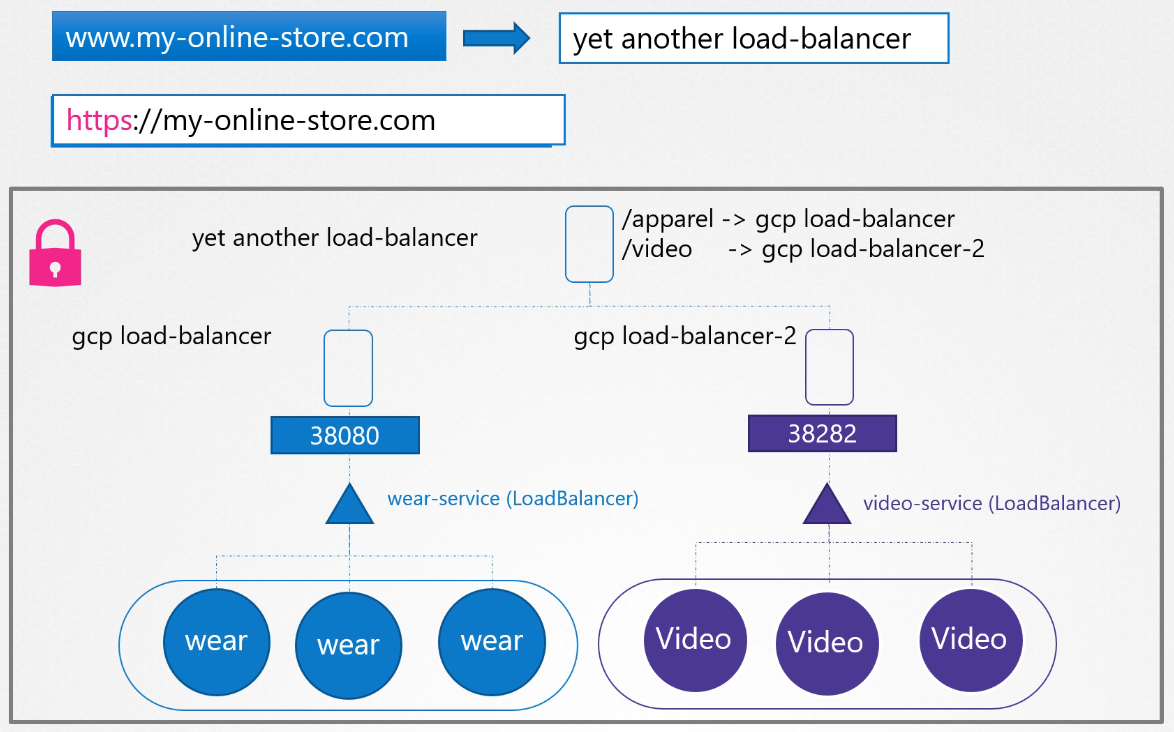
You can configure it to route traffic to different services based on URL paths and also implement SSL. Ingress acts as a layer 7 load balancer built into Kubernetes, configurable using Kubernetes resources. You still need to expose the Ingress controller externally (e.g., via NodePort or LoadBalancer), but once set up, you handle all your load balancing and SSL configurations through the Ingress controller.
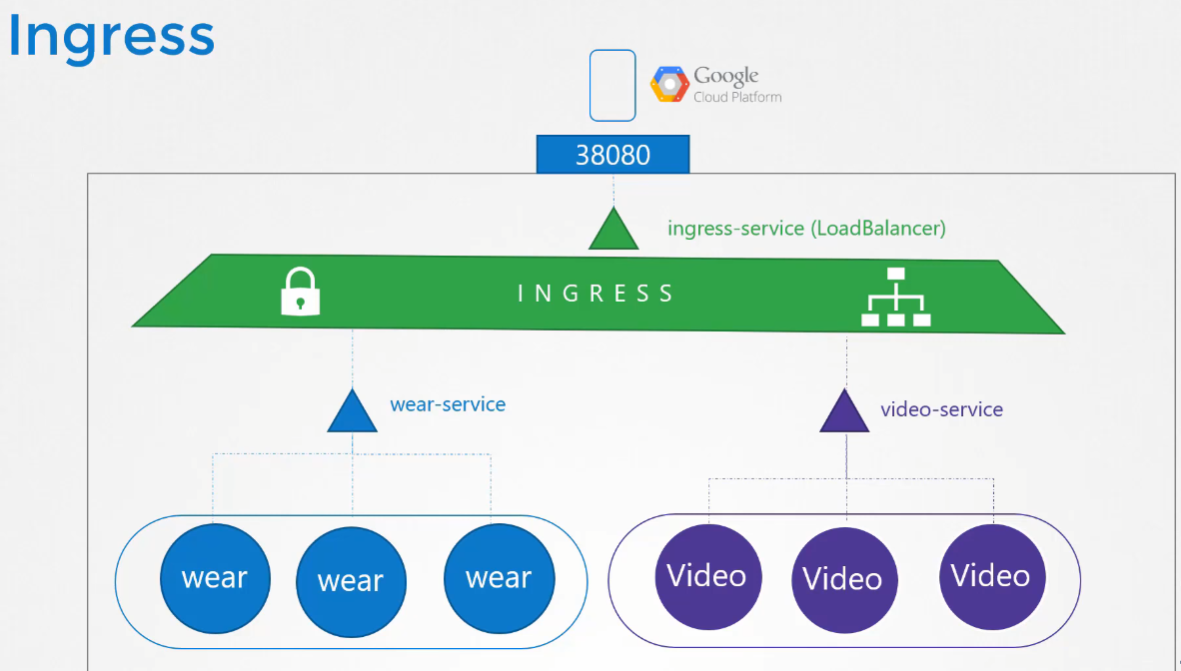
Kubernetes doesn’t come with an Ingress controller by default, so you need to deploy one yourself. There are several options, such as GCE (Google’s load balancer), Nginx, Contour, HAProxy, and Traefik. In this lecture, we’ll use Nginx as an example.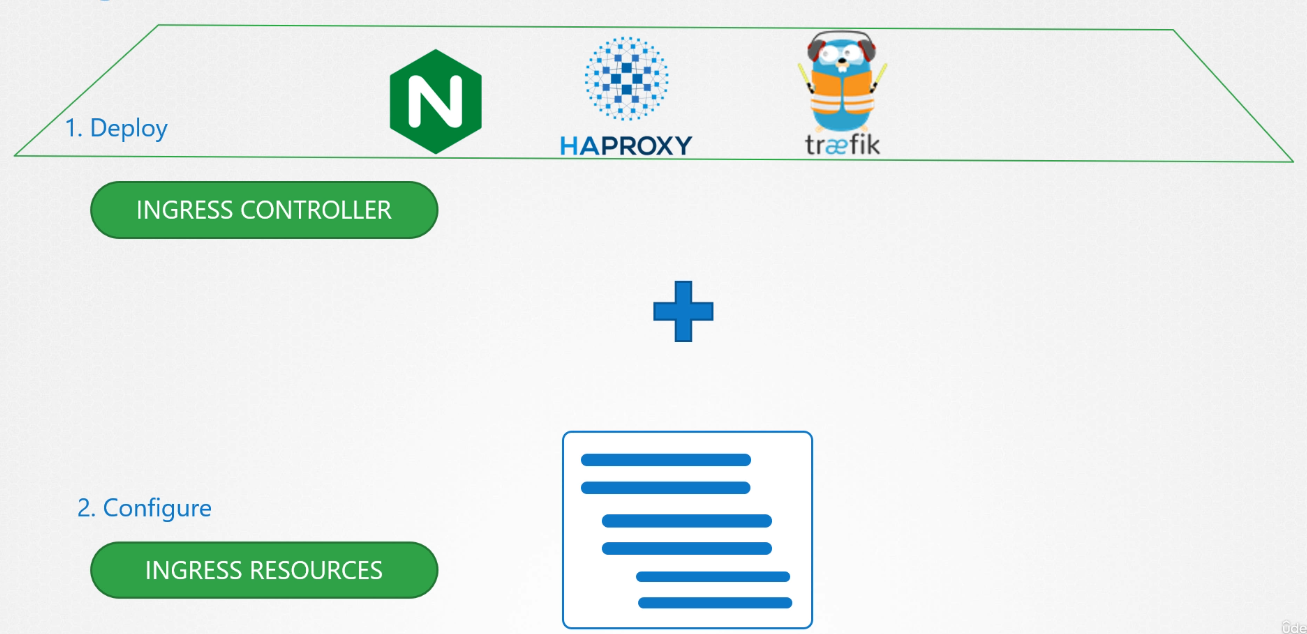
Ingress Controller
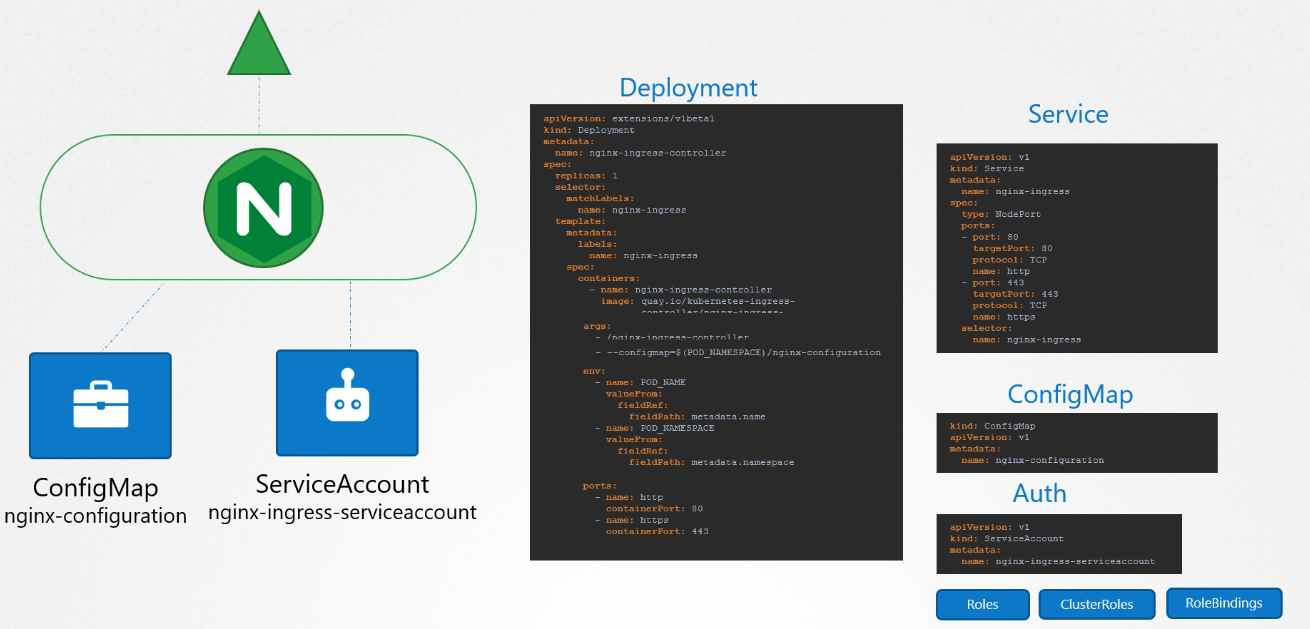
To use Ingress resources, you need an Ingress Controller. Without it, Ingress resources won’t have any effect. The Nginx Ingress controller is deployed as a Kubernetes deployment. It requires:
- A deployment definition file specifying the image and pod template.
- A config map to manage configuration settings.
- A service to expose it (NodePort or LoadBalancer).
- A service account with the right permissions.
This setup monitors the Kubernetes cluster for Ingress resources and configures the Nginx server accordingly.
Examples of Ingress Controllers:
Ingress Resources
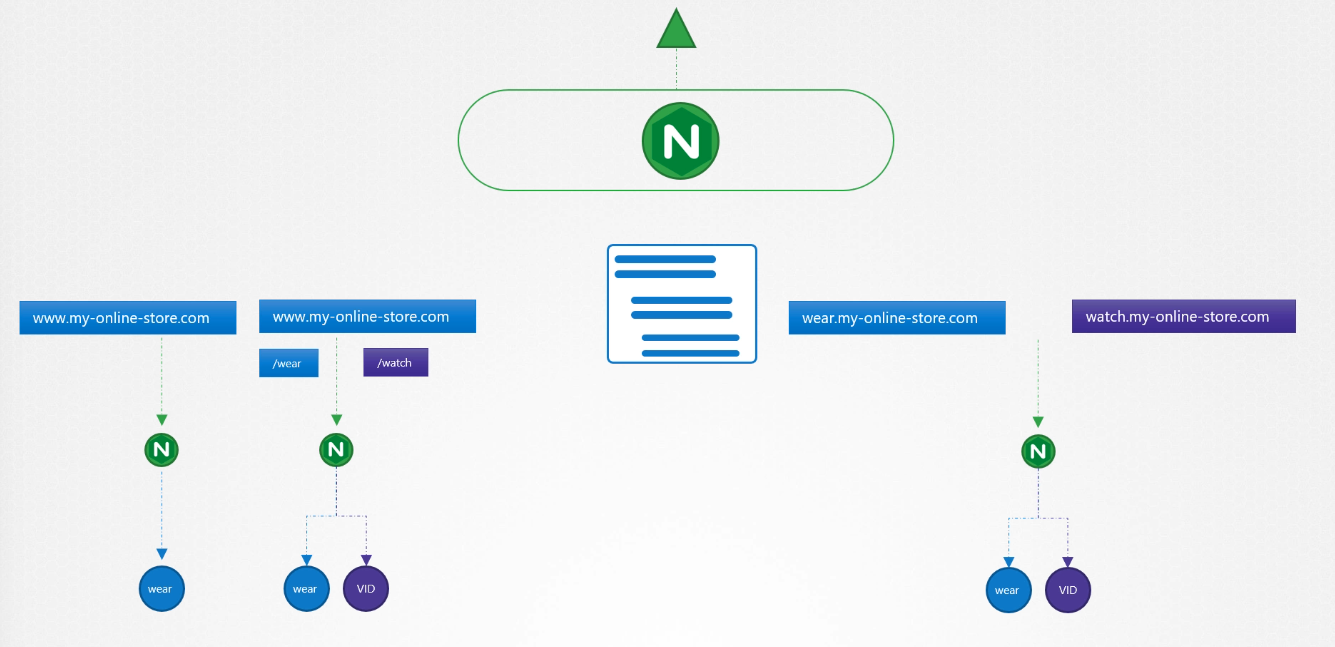
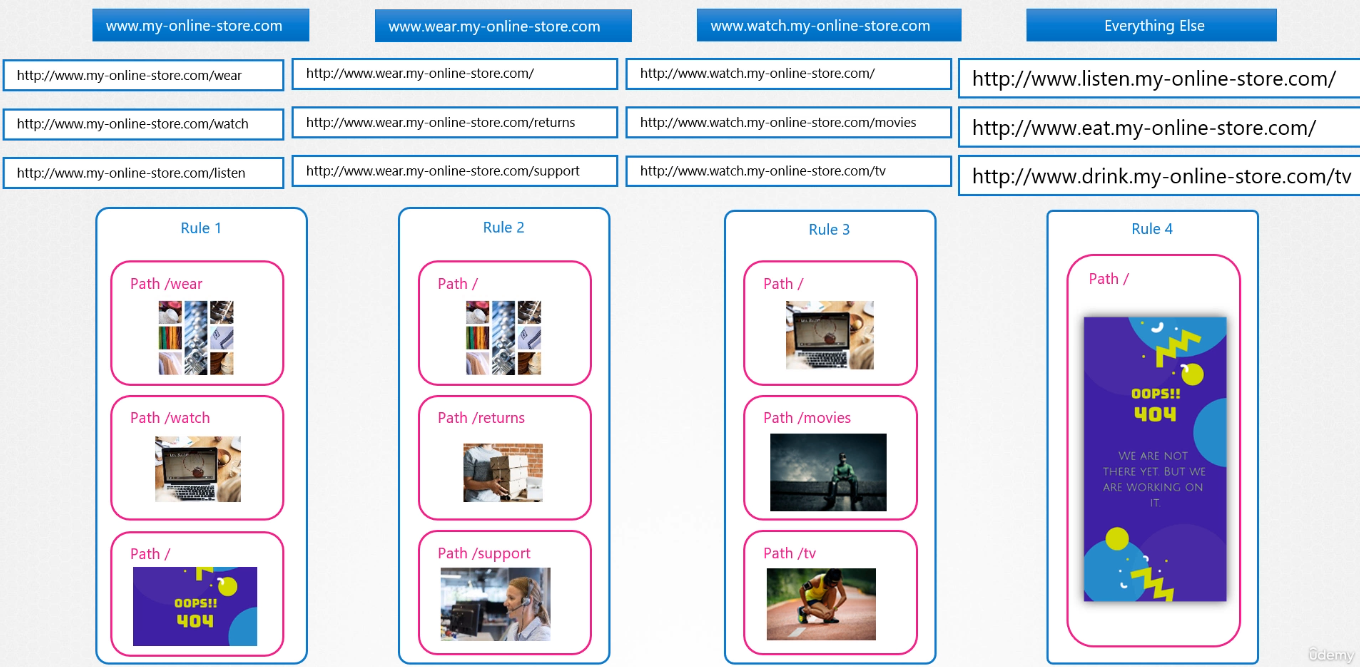
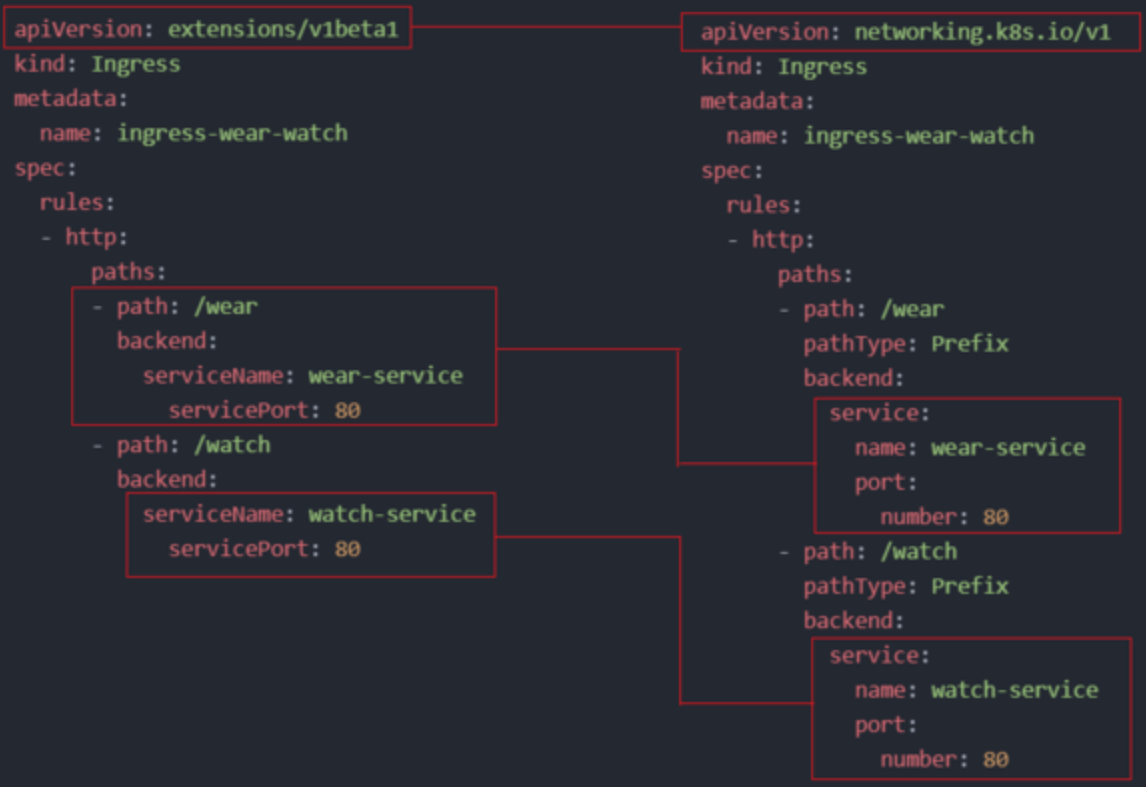
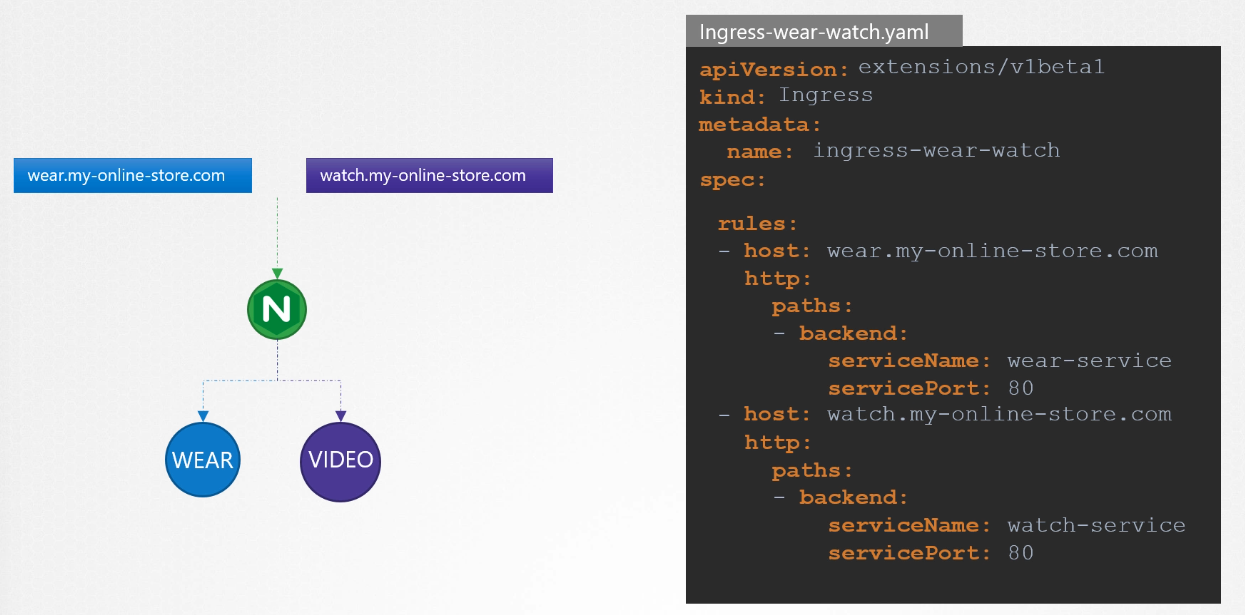
Ingress resources define rules for routing traffic based on the URL or domain. For example, you can route my-online-store.com/wear to one application and my-online-store.com/watch to another. You can also use host-based routing, such as wear.my-online-store.com or watch.my-online-store.com.
controlplane ~ ➜  k describe ingress ingress-wear-watch --namespace=app-space
Name:             ingress-wear-watch
Labels:           <none>
Namespace:        app-space
Address:          10.97.213.150
Ingress Class:    <none>
Default backend:  <default>
Rules:
  Host        Path  Backends
  ----        ----  --------
  *
              /wear    wear-service:8080 (10.244.0.4:8080)
              /watch   video-service:8080 (10.244.0.5:8080)
Annotations:  nginx.ingress.kubernetes.io/rewrite-target: /
              nginx.ingress.kubernetes.io/ssl-redirect: false
Events:
  Type    Reason  Age                    From                      Message
  ----    ------  ----                   ----                      -------
  Normal  Sync    8m33s (x2 over 8m33s)  nginx-ingress-controller  Scheduled for sync
controlplane ~ ➜ k get ingress ingress-wear-watch --namespace=app-space -o yaml
apiVersion: networking.k8s.io/v1
kind: Ingress
metadata:
annotations:
nginx.ingress.kubernetes.io/rewrite-target: /
nginx.ingress.kubernetes.io/ssl-redirect: "false"
creationTimestamp: "2024-10-10T06:27:38Z"
generation: 1
name: ingress-wear-watch
namespace: app-space
resourceVersion: "1003"
uid: b86a3d0a-a17a-410a-b72b-32cab3ac8075
spec:
rules:
- http:
paths:
- backend:
service:
name: wear-service
port:
number: 8080
path: /wear
pathType: Prefix
- backend:
service:
name: video-service
port:
number: 8080
path: /watch
pathType: Prefix
status:
loadBalancer:
ingress:
- ip: 10.97.213.150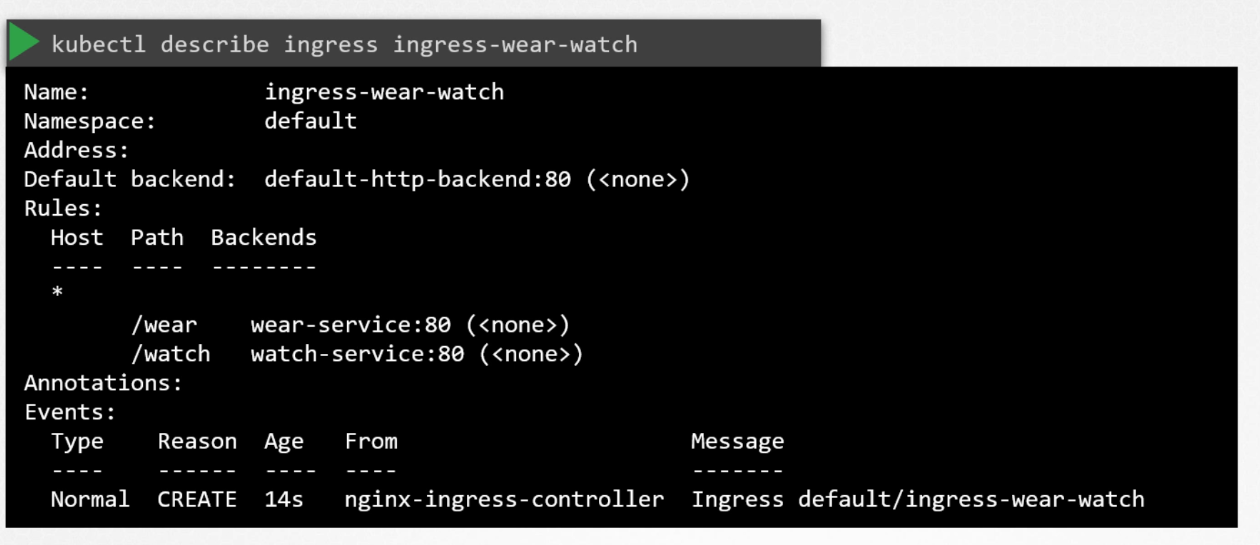
Traffic Splitting
- By URL: Single rule.
- By hostname: Multiple rules, one for each path.
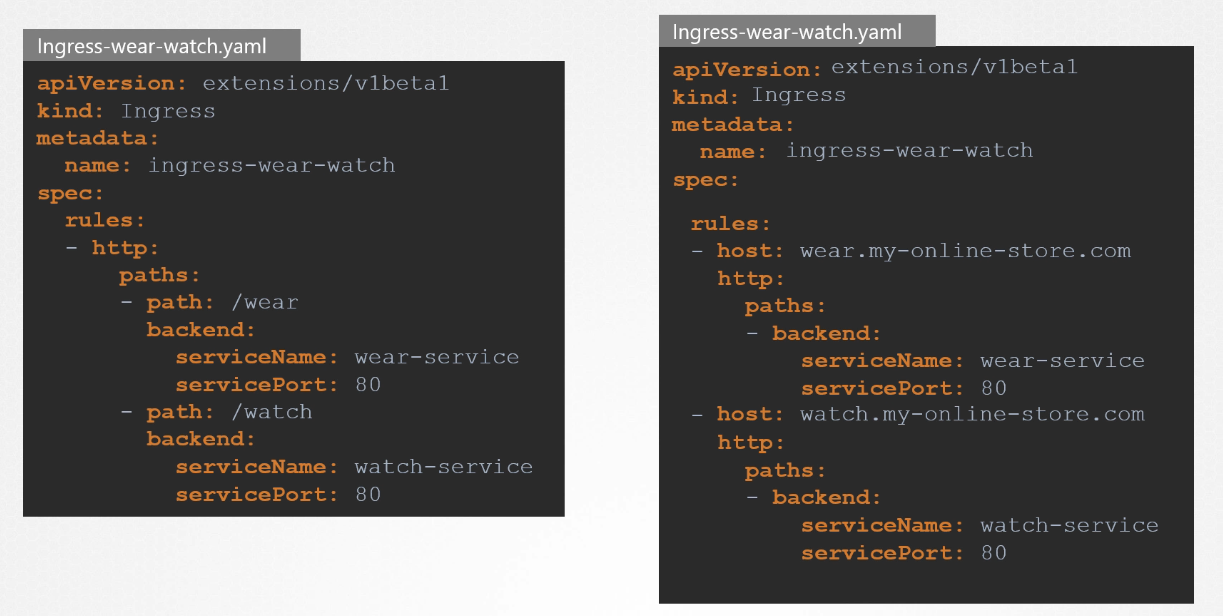
# Example: Creating Ingress Resources

kubectl get deployment
kubectl get svc nginxsvc
curl http://$(minikube ip):32000

kubectl create ingress nginxsvc-ingress --rule="/=nginxsvc:80" --rule="/hello=newdep:8080"

sudo vim /etc/hosts
echo "$(minikube ip) nginxsvc.info" >> /etc/hosts
kubectl get ingress # Wait until it shows an IP address
curl nginxsvc.info

kubectl create deployment newdep --image=gcr.io/google-samples/hello-app:2.0
kubectl expose deployment newdep --port=8080
curl nginxsvc.info/hello
# Ingress Creation Format
kubectl create ingress <name> --rule="host/path=service:port"
# Example
kubectl create ingress ingress-test --rule="wear.my-online-store.com/wear*=wear-service:80" Ingress Path Types
The Ingress pathType specifies how to deal with path requests
- Exact: Matches exact paths (e.g.,
/foo). - Prefix: Matches based on the start of a path (e.g.,
/fooor/foo/).
Ingress Types
# Single Service
kubectl create ingress single --rule="/files=filesservice:80"

# Simple Fanout
kubectl create ingress single --rule="/files=filesservice:80" --rule="/db=dbservice:80"

# Name-based Virtual Hosting
kubectl create ingress multihost --rule="my.example.com/files*=filesservice:80" --rule="my.example.org/data*=dataservice:80"
Name-Based Virtual Hosting Demo
kubectl create deploy mars --image=nginx
kubectl create deploy saturn --image=httpd
kubectl expose deploy mars --port=80
kubectl expose deploy saturn --port=80

# Add entries to /etc/hosts
echo "$(minikube ip) mars.example.com" >> /etc/hosts
echo "$(minikube ip) saturn.example.com" >> /etc/hosts

kubectl create ingress multihost --rule="mars.example.com/=mars:80" --rule="saturn.example.com/=saturn:80"
kubectl edit ingress multihost; # Change pathType to Prefix
curl saturn.example.com; curl mars.example.com
IngressClass
IngressClass (introduced in Kubernetes 1.22) specifies a default Ingress controller for the cluster. Each Ingress resource should refer to a class matching the cluster’s default IngressClass.