By default, there are no restrictions to network traffic in K8s. Pods can always communicate, even if they’re in other Namespaces. To limit this, Network Policies can be used.
- If in a policy there is no match, traffic will be denied
- If no Network Policy is used, all traffic is allowed
K8s support for network policies
Network Policies need to be supported by the network plugin though. More detail in Network solutions that support Network Policies):
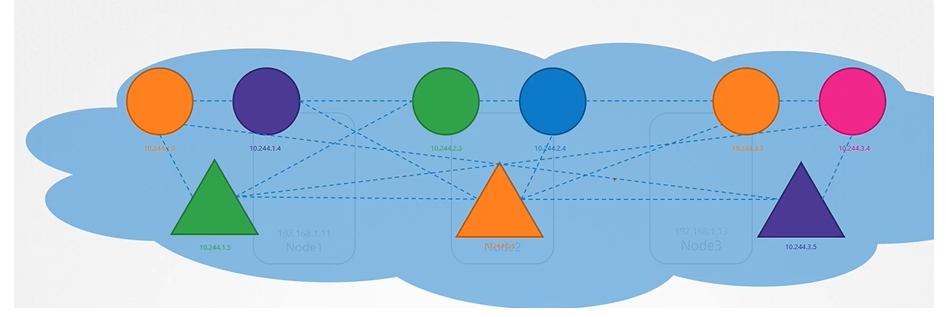
In K8s pods can talk to each other as they have a virtual networking solution.
Network plugin implementation
One prerequisite for networking in Kubernetes is that whatever solution you implement, the pods must be able to communicate with each other without requiring additional configurations, such as routing. For example, in this networking solution, all pods reside on a virtual private network that spans across the nodes in the Kubernetes cluster, allowing them to reach each other by default using IP addresses, pod names, or services set up for that purpose.
Kubernetes is configured by default with an “Allow All” rule, permitting traffic from any pod to any other pod or service within the cluster.
Ingress vs Egress
Consider below scenario: traffic flowing through a webserver serving frontend to users an app server serving backend API and a database server.
Note
When defining ingress and egress, focus on where the traffic is originated from. Ingress refers to incoming traffic to a resource, while egress refers to outgoing traffic from it.
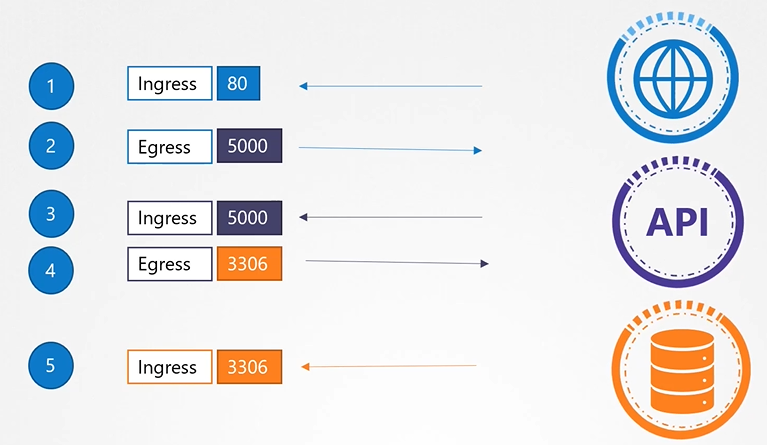
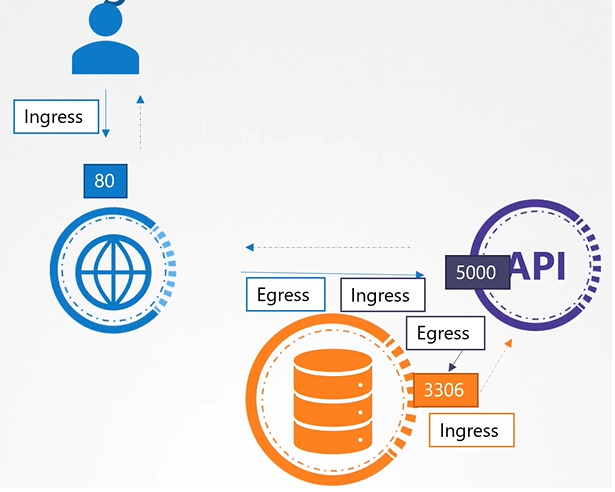 To make this configuration work, we need to define the following rules:
- An ingress rule to accept HTTP traffic on port 80 for the web server.
- An egress rule to allow traffic from the web server to port 5000 on the API server.
- An ingress rule to accept traffic on port 5000 for the API server.
- An egress rule to permit traffic to port 3306 on the database server.
- Finally, an ingress rule on the database server to accept traffic on port 3306.
Network policy
Kubernetes is configured by default with an “Allow All” rule, permitting traffic from any pod to any other pod or service within the cluster. By default, all of these components can reach each other. We use network policies to restrict access when needed.
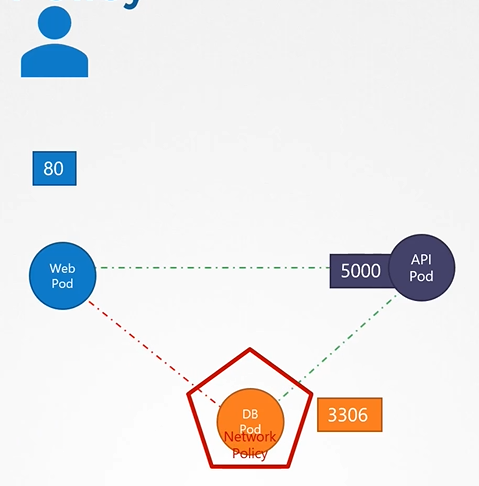
Linking network policy to pod
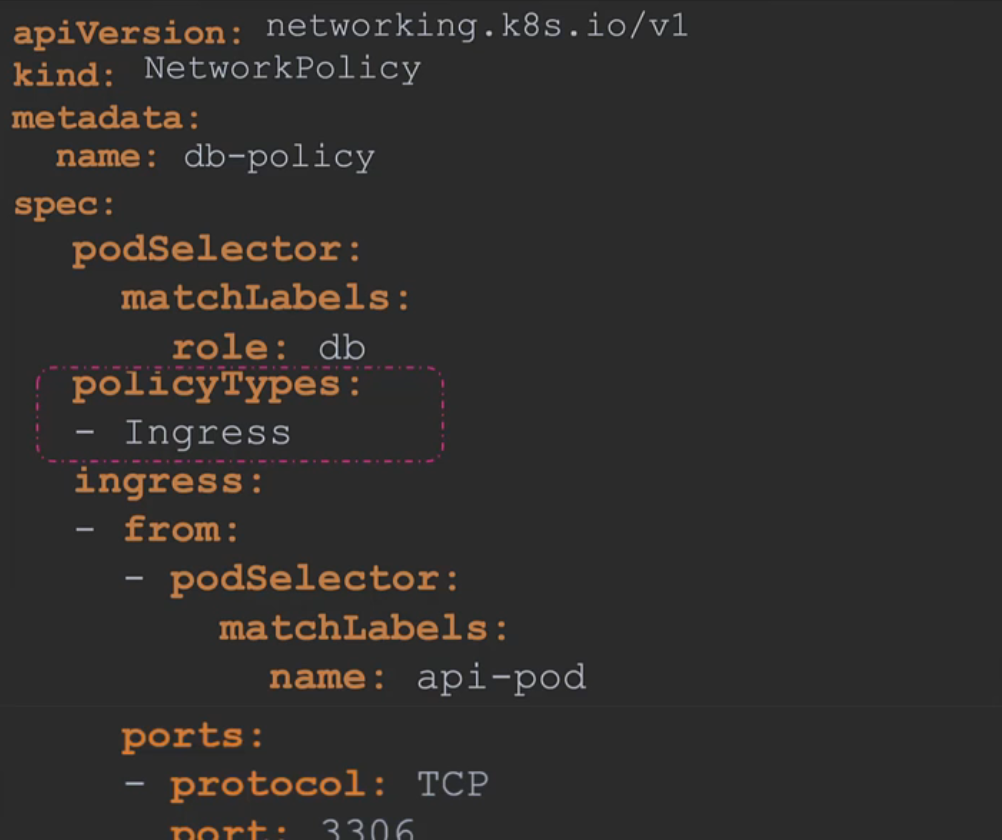
You link a network policy to one or more pods and define rules within that policy. For example, you might specify that only ingress traffic from the API pod on port 3306 is allowed. Once this policy is created, it blocks all other traffic to the pod, allowing only traffic that matches the specified rule.
We use the same technique as before to link replica sets or services to pods: labels and selectors.
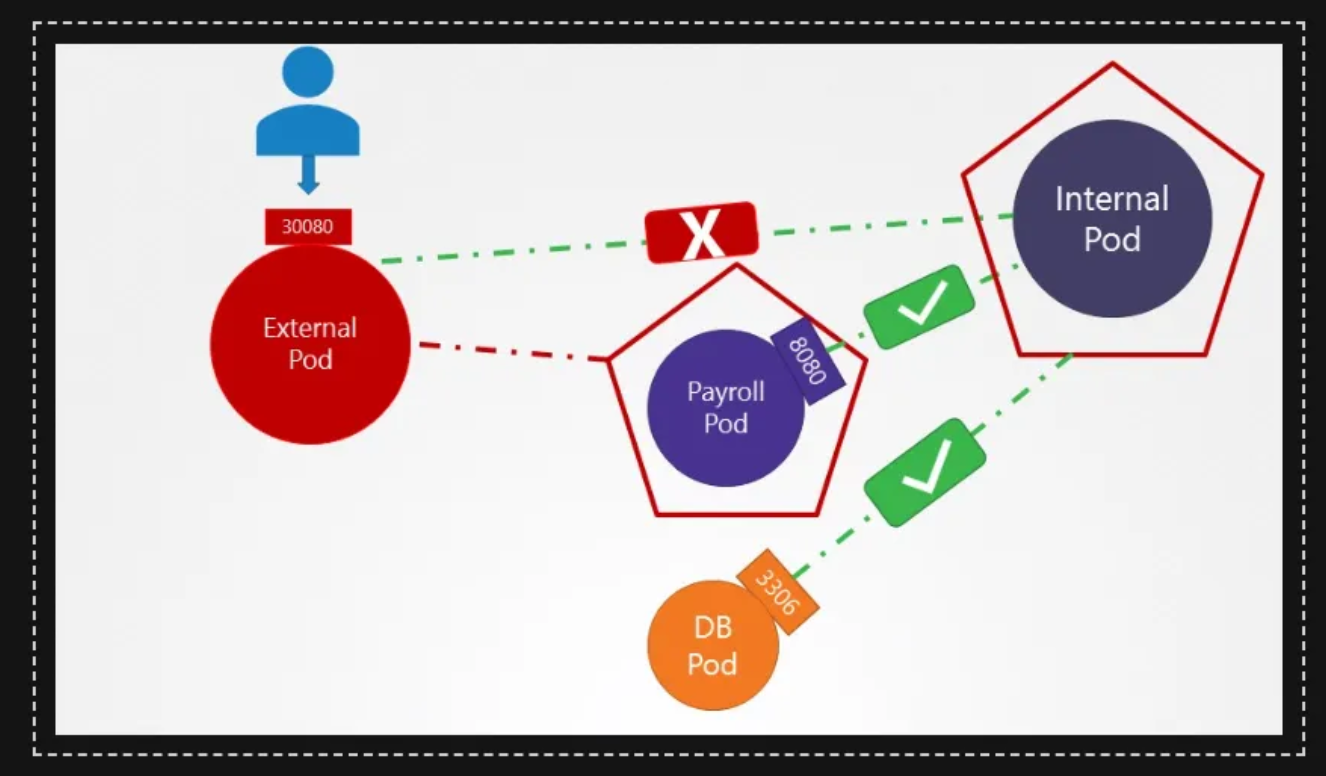
apiVersion: networking.k8s.io/v1
kind: NetworkPolicy
metadata:
  name: internal-policy
  namespace: default
spec:
  podSelector:
    matchLabels:
      name: internal
  policyTypes:
  - Egress
  egress:
  - to:
    - podSelector:
        matchLabels:
          name: mysql
    ports:
      - protocol: TCP
        port: 3306
  - to:
    - podSelector:
        matchLabels:
          name: payroll
    ports:
    - protocol: TCP
      port: 8080
Note: We have also allowed Egress traffic to TCP and UDP port. This has been added to ensure that the internal DNS resolution works from the internal pod.
Remember: The kube-dns service is exposed on port 53:
root@controlplane:~> kubectl get svc -n kube-system
NAME       TYPE        CLUSTER-IP   EXTERNAL-IP   PORT(S)                  AGE
kube-dns   ClusterIP   10.96.0.10   <none>        53/UDP,53/TCP,9153/TCP   18m
Another examples:
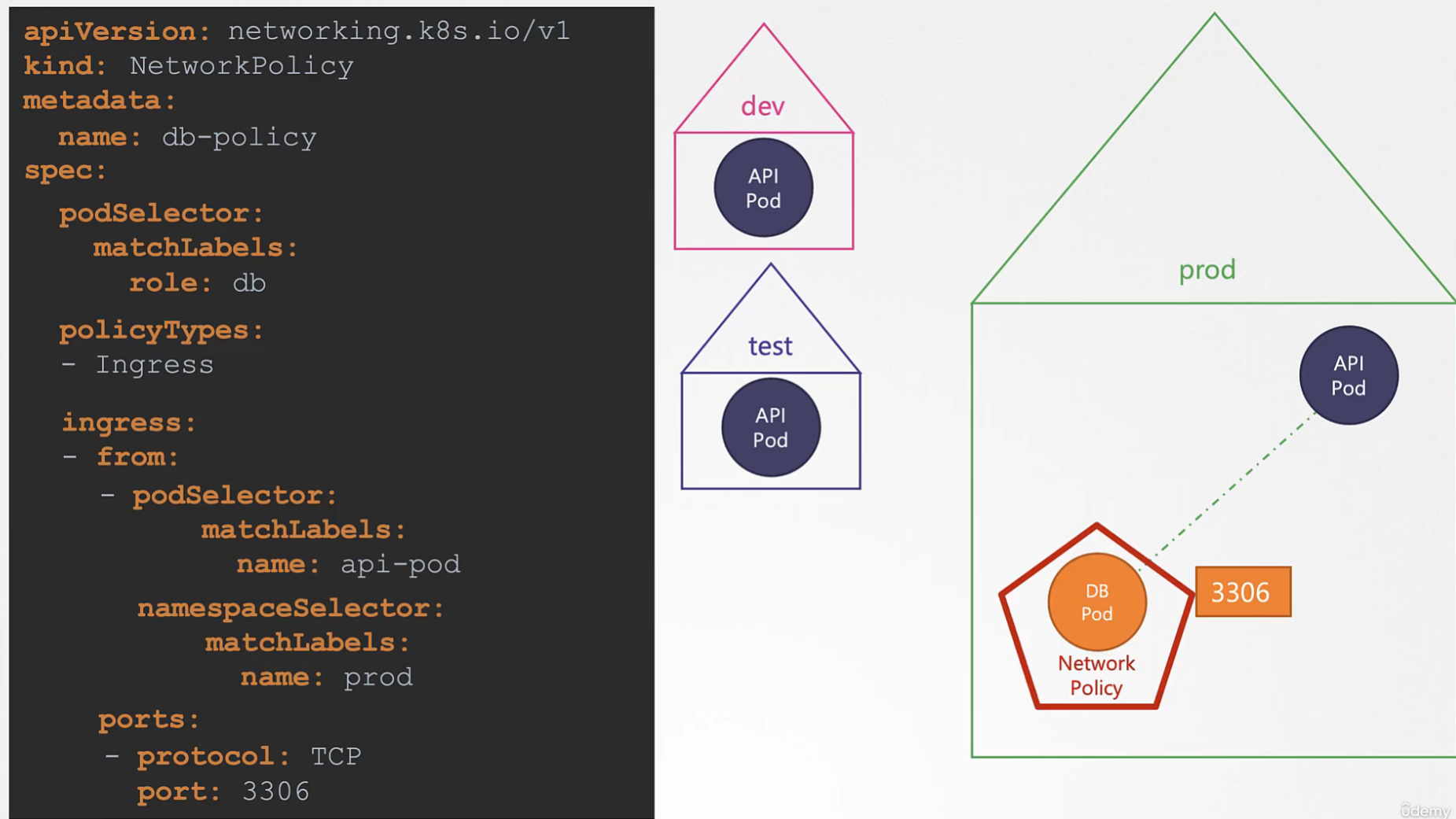
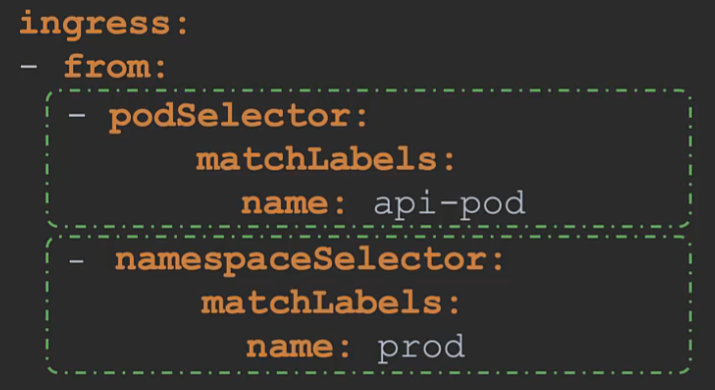
Another example based on the previous one: if we take the pod selector away from previous example, that means all the ingress traffic from prod will be acceptable
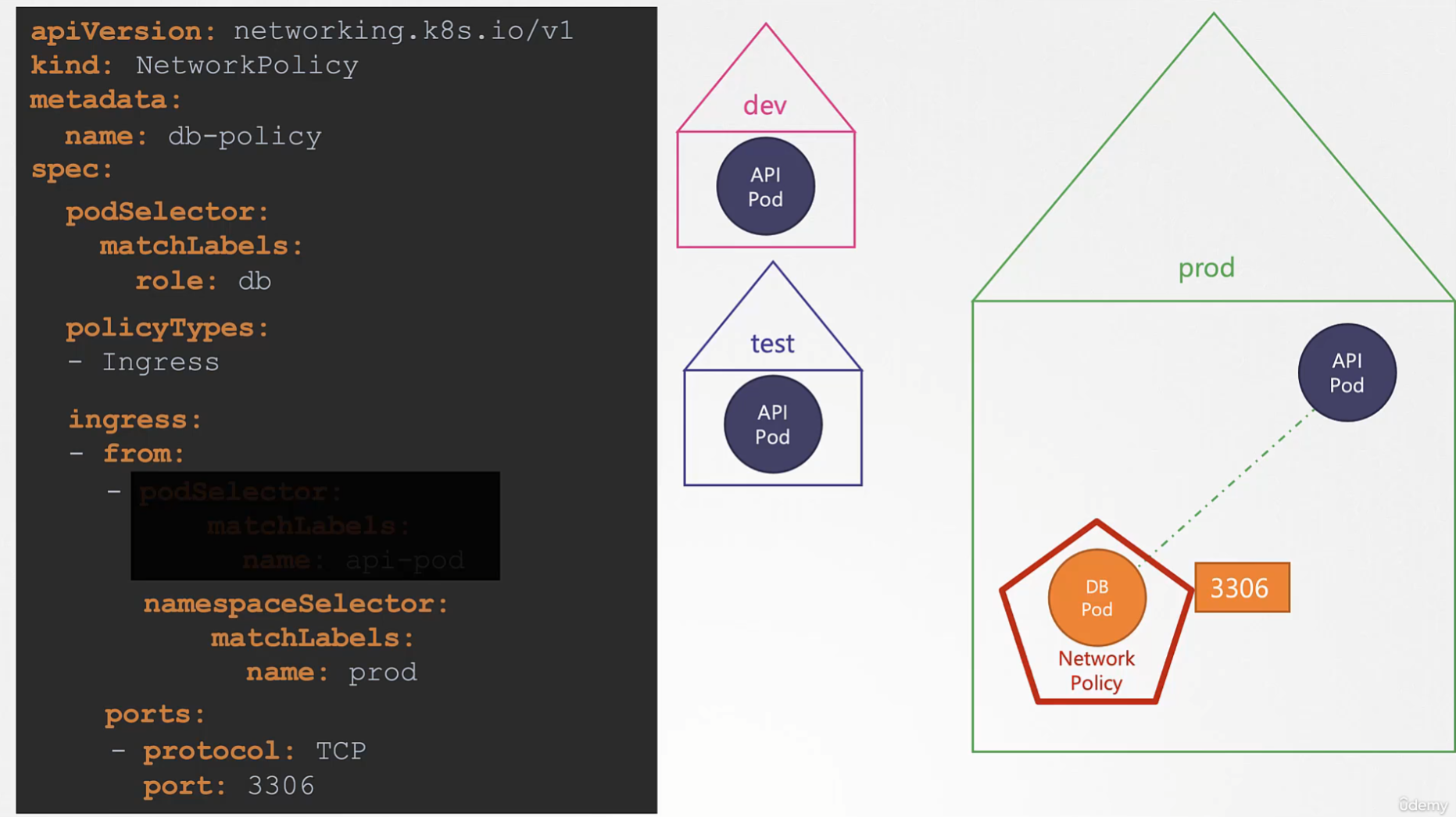
AND & and OR || in the pod selector
Ingress traffic from pods that match name: api-prod label AND the ones that are in a namespace named name: prod
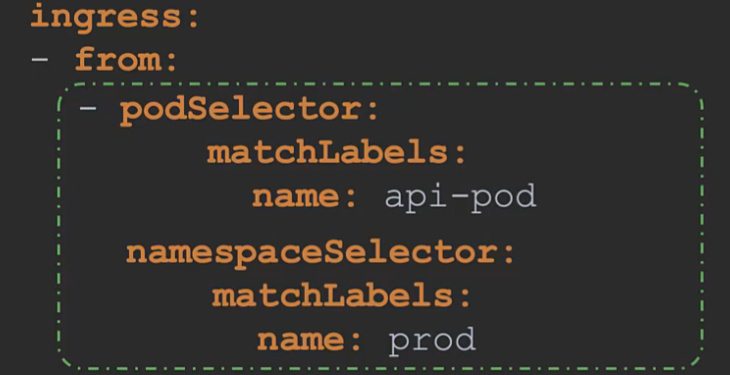 Ingress traffic from pods that match
 name: api-prod label OR the ones that are in a namespace named `name: prod
Network policy isolation
Note that ingress or egress isolation only takes effect if you include ingress or egress in the policy types. In this example, since only ingress is specified in the policy type, only ingress traffic is isolated, leaving all egress traffic unaffected. This means the pod can make any egress calls without being blocked. Therefore, for egress or ingress isolation to occur, you must add them under the policy types, as shown here; otherwise, there will be no isolation.
Network solutions that support Network Policies
Remember that network policies are enforced by the networking solution implemented in the Kubernetes cluster, and not all network solutions support them. Some solutions that do support network policies include Kube Router, Calico, Romana, and Weave Net. However, if you are using Flannel as the networking solution, it does not support network policies as of this recording.
Network solution with no support for network policies
Also, remember that even in a cluster configured with a solution that does not support network policies, you can still create the policies; however, they will not be enforced. You won’t receive an error message indicating that the network solution does not support network policies.
# By default, Minikube comes without a network plugin
# Use the --cni=calico option to minikube start to start Minikube with the calico plugin
# To verify if the calico agent is used, use kubectl get pods -n kube-system
# If it's not used yet, use the following to restart Minikube with the calico plugin:
$ minikube stop
$ minikube delete
$ minikube start --cni=calico